
I’ve been teaching bagpipes full-time since 1999, and I’ve developed a program that combines the very best of traditional teaching methods with the latest technology to help you learn efficiently — using a combination of one-on-one lessons and access to my online teaching materials.
First you’ll need to sign up for the BagpipeLessons.com Studio — the online lesson library and community for my students. The Studio has TONS of exclusive piping related content: tunes, videos, exercises, mp3s, and allows you to comment, post questions, etc. We’ll use the lessons on the Studio in conjunction with your lessons, and it allows us to make the most of our lesson time together. The Studio is very popular with all of my students and especially my online students who often need to tackle various maintenance, setup, and tuning issues without my physical hands-on assistance. You can pay for this monthly or purchase a full year at a discounted rate.
Depending on your experience level, you will want to download my Tune and Video Lesson Downloads. The tune lesson downloads are a great resource and include sheet music, a perfectly matched recording, and a detailed audio lesson on the tune. I have 74 tunes total. The Video Lesson Downloads cover the basics of piping technique, starting with the scale and moving through all of the piping embellishments.
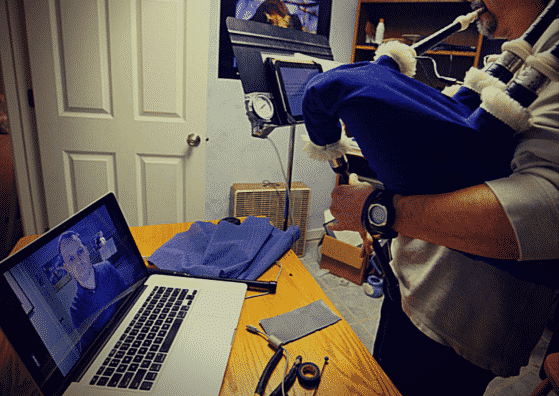
Online Lessons via Skype or Facetime
I was the first bagpipe teacher to offer live online video bagpipe lessons via Skype. I was featured on the front page of the New York Times on their story about the growth of online music lessons. Today, online one-on-one lessons are incredibly popular — I have students of all ages and ability levels around the world.
For most pipers, I recommend a half-hour online lesson every 2 or 3 weeks, but we can have lessons more or less often if you prefer. The next step is to find a time that works for both of us. Please use the contact form below if you are interested to learn more about lessons online.
In-Person Lessons
If you can travel to Seattle, we can set up a schedule for in-person lessons at my teaching studio. Most of my students come for lessons every week or every other week, but if you are traveling we can set up a schedule that works for you, including video and in-person lessons. Some my students prefer a combination of Skype lessons and some in-person lessons. I teach lessons at my studio in the Broadview neighborhood of Seattle (just south of The Highlands and north of Piper’s Creek).
The next step is to find a time that will work for both of us. Please use the contact form below if you are interested to learn more about in person lessons.
Contact Me
What my students say…
I am ecstatic with the difference in my playing today after my first lesson! Jason G.
The BagpipeLessons.com Studio is a true joy. So much there it will take months to grasp it all.E.K.
Jori is an exceptionally gifted teacher and very motivating. S. Smith, M.D.